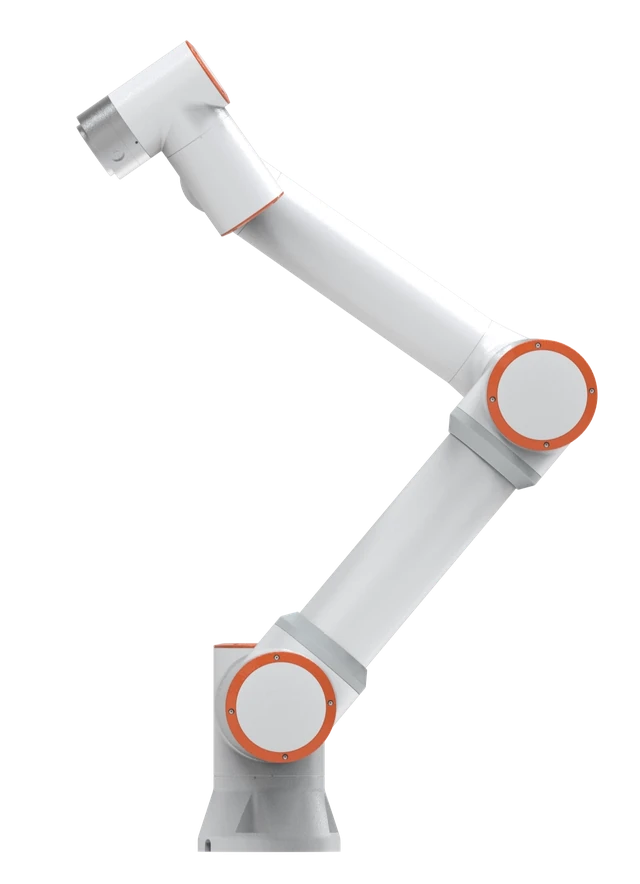
One configuration to evaluate for the requirements discussed here. Check tooling load, the complete motion path and process requirements before selecting the arm.
View FR5 specifications and quote considerationsPicture the cell eight months after handover. A customer revises a part, the integrator is on another job, and second shift needs the new pick position today. Whether that takes ten minutes or a purchase order depends on how the robot was programmed and who on your staff can open that program. The FAIRINO documentation examples in this guide cover several programming routes, from dragging the arm by hand to driving it from your own software. The buying decision is which routes your people will really use.
The FAIRINO statements below were read in its public documentation on October 9, 2026. Functions vary with controller and software version, so confirm each for the quoted configuration.
Five ways to program a cobot, compared
| Method | Who uses it | Good for | Limits |
|---|---|---|---|
| Teach pendant or web interface | Technicians, setters, trained operators | Point-to-point handling, I/O, touch-ups at the cell | Long logic gets hard to read; edits happen at the robot |
| Hand guiding (drag teaching) | Operators and welders who know the task | Capturing positions and paths quickly | Hand-placed points are only as precise as the hand; logic still has to be written |
| Graphical or block programming | Staff new to robots; pendant users without a keyboard | Readable sequences, simple branching, training | Large programs sprawl; advanced functions may need script |
| Script language | Controls engineers, programmers | Loops, calculations, recipes, device protocols | Needs coding discipline, comments and version control |
| SDK or API from a PC, or registers from a PLC | Software and PLC engineers | Vision-driven motion, line control, data collection | The cell now depends on an external computer, network and its maintainer |
What FAIRINO's documentation shows for each
Web interface. The manual's WebApp access chapter has the user connect a PC to the control box and log in through a browser; the same page names three teaching-program modes: coding, graphical and node graph programming. The FAIRINO US FR5 page lists a 10.1 inch teach pendant or a mobile web app as the operating terminal. Ask which is in the quote.
Hand guiding. The manual teaching chapter gives two ways to record a point: hold the end drag button and move the arm, or jog it in the 3D view. Dragging is fast for a FAIRINO FR5 pick position; a process point such as a torch tip also needs a correct tool definition, covered in our TCP guide.
Graphical. The graphical programming chapter says the blocks are built on the Blockly library and that a dragged program is converted to a Lua program before it runs. A node graph editor is documented as a second visual option.
Script. In the coding chapter, a program is a tree of command nodes with a toggle to a Lua editing mode. The same chapter documents Modbus TCP master and slave setup and a socket interface.
SDK. The SDK manual has sections for C++, C#, Java and Python, and the FAIR-INNOVATION GitHub organisation, which the documentation's download page links to, hosts a repository for each. A separate section documents CNDE, a configurable data exchange over UDP for cyclic status and control.
The pages read for this guide did not establish EtherNet/IP, PROFINET or EtherCAT support, so treat any fieldbus requirement as an item to confirm. Our EtherNet/IP versus TCP/IP guide explains what to ask.
Choose by who will maintain it
List who will touch the robot after acceptance and what each must do without help.
- Operators select a program, recover from a stop and perhaps re-teach a point. Pendant and hand guiding cover this.
- A setter or technician adds a part variant. Graphical or tree programming is enough if the integrator built the program with named points and clear structure.
- A controls engineer changes the machine handshake or adds a recipe. That needs script access and the interface documentation.
- A software engineer connects vision or plant data. That needs the SDK, a maintained PC and someone who owns that code.
If the last two roles do not exist in your plant, a cell that depends on a custom PC application depends on outside support. A simpler pendant program on a FAIRINO FR10 that your technician can read may be worth more than a cleverer one nobody can edit. For pattern-heavy work, see palletizing programming and changeovers.
Programming is also a safety task. OSHA's robot systems chapter notes that the person teaching may be inside the robot's restricted space, where a mistake can cause injury, and refers to reduced teaching speeds of 250 mm/s or less.
Offline work, simulation and where ROS fits
Offline programming means preparing or testing programs away from the production robot. FAIRINO documents SimMachine, a virtual controller supplied as a VMware image or a Docker deployment that serves the same WebApp. That suits training and logic checks. Reach and clearance in your cell still need your layout and tooling geometry in a simulation tool, or a trial on the real arm.
ROS, the Robot Operating System, is a separate software route. ROS-Industrial describes itself as an open-source project that brings ROS to manufacturing, with interfaces for industrial manipulators, sensors and device networks. FAIRINO publishes ROS and ROS 2 packages: its ROS 2 guide recommends Ubuntu 22.04 with ROS 2 Humble and builds on ros2_control, and the frcobot_ros2 repository README requires robot software newer than V3.7.1 and includes MoveIt 2 configuration packages for several models. ROS suits research, custom motion planning and multi-vendor software teams. For a tending or palletizing cell with a fixed sequence, the controller's own tools are normally the shorter path, and a Linux and ROS stack needs someone on staff to maintain it.
What to ask in a demo about changeover and ownership
- Show a new part variant being added on the quoted software version. Who did it, and how long did it take?
- Which login levels exist and who gets each? The teach pendant software chapter lists six default user levels with different permissions; default passwords should be changed.
- How are programs backed up and restored? The manual describes a data backup function covering user programs, teaching points, tool coordinate data and configuration files. Ask where your copies will be kept.
- Will any program be encrypted or locked? The coding chapter documents program encryption levels. Make delivery of editable source, PLC code and PC application code a written deliverable.
- If the integrator leaves, what would a new one need, and do you already hold it?
- Which controller software version was accepted, and who approves updates?
Bring your part list and the names of the people who will maintain the cell, then request a demo or consultation. The project planner can record interfaces and changeovers beforehand.
Sources and further reading
- FAIRINO documentation: WebApp access and login (teaching program modes)
- FAIRINO documentation: Graphical programming
- FAIRINO documentation: SDK Manual (C++, C#, Java, Python)
- FAIRINO documentation: FAIRINO SimMachine
- GitHub: FAIR-INNOVATION frcobot_ros2 repository
- ROS-Industrial: project description
- OSHA Technical Manual: Industrial Robot Systems and Industrial Robot System Safety
Plan your next automation project
Share your parts, process, and production goals. Get help comparing robot options, planning the complete application, and deciding what to do next.
Request a consultation